Blog
Apple Mac Mini M4 Specifications Guide

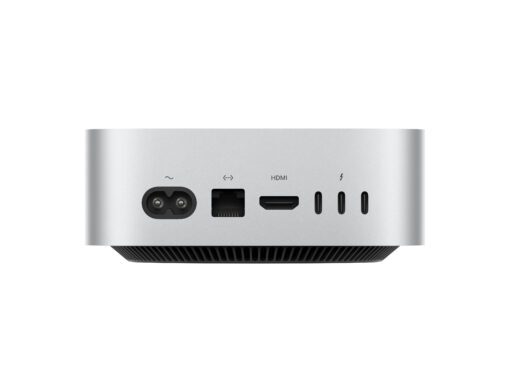
Apple Mac Mini M4 Specifications: Everything You Need to Know in 2025
Introduction
Apple’s Mac Mini has always been the go-to choice for professionals and creators seeking compact performance without compromise. With the arrival of the Apple Mac Mini M4, Apple has raised the bar yet again—delivering faster processing, advanced AI-driven efficiency, and cutting-edge GPU capabilities in a device small enough to fit in the palm of your hand.
In this blog, we’ll break down the Apple Mac Mini M4 specifications, performance benchmarks, unique features, and address frequently asked questions that customers and professionals are asking in 2025. Whether you’re a creative professional, developer, or business executive, this guide will give you clarity on why the Mac Mini M4 is Apple’s most powerful mini desktop yet.
Apple Mac Mini M4 Specifications Overview
Here’s a quick breakdown of the official Mac Mini M4 specifications:
Processor: Apple M4 chip (3nm architecture)
CPU: Up to 12-core performance (8 performance + 4 efficiency cores)
GPU: Up to 16-core integrated GPU with hardware-accelerated ray tracing
Neural Engine: Next-gen 32-core Neural Engine for AI and machine learning tasks
Memory (RAM): Unified Memory up to 64GB
Storage Options: SSD storage up to 8TB
Connectivity: Wi-Fi 7, Bluetooth 5.4, Thunderbolt 5 ports, HDMI 2.1
Operating System: macOS Sequoia (optimized for M4)
Form Factor: Same compact aluminum body as the M2/M3 versions
This makes the Mac Mini M4 three times faster than the Intel-based Mac Minis and nearly 40% faster than the M2-powered version in real-world creative workloads.
Key Features of the Apple Mac Mini M4
1. Revolutionary M4 Chip Performance
Apple’s new 3nm architecture allows the M4 to deliver higher performance at lower power consumption. Early benchmarks suggest a single-core performance increase of 25% and multi-core gains exceeding 40% compared to the M2 chip.
2. Enhanced Graphics for Creatives and Gamers
With hardware-accelerated ray tracing, the Mac Mini M4 delivers lifelike visuals and 4K/8K video editing without stutter. Designers, video editors, and game developers will see drastic improvements in rendering speeds.
3. AI and Machine Learning Efficiency
The 32-core Neural Engine makes the Mac Mini M4 a top choice for AI developers, researchers, and businesses leveraging automation. It processes 30 trillion operations per second (TOPS), enabling smoother workflows in AI training, image recognition, and automation.
4. Seamless Connectivity
Equipped with Thunderbolt 5 ports, Wi-Fi 7, and HDMI 2.1, the Mac Mini M4 offers future-proof connectivity, allowing support for multiple 8K monitors at 120Hz.
5. Sustainable and Compact Design
Apple continues its sustainability drive with the Mac Mini M4, using 100% recycled aluminum in its chassis while maintaining the ultra-compact design that professionals love.
Frequently Asked Questions (FAQs)
1. What makes the Mac Mini M4 different from the M2 version?
The Mac Mini M4 is a significant leap forward, offering up to 40% better CPU performance and 50% better GPU performance than the M2 version. It also introduces hardware-accelerated ray tracing and Wi-Fi 7 connectivity.
2. Is the Mac Mini M4 good for professional video editing?
Absolutely. With its 16-core GPU and up to 64GB unified memory, the Mac Mini M4 can handle 8K ProRes video editing, Final Cut Pro projects, and DaVinci Resolve workflows with ease.
3. Can the Mac Mini M4 replace a workstation PC?
Yes. For most professionals, the Mac Mini M4 delivers workstation-level performance in a fraction of the size. It’s ideal for software developers, AI researchers, and designers who want power without the bulk.
4. What is the maximum RAM supported in the Mac Mini M4?
The Mac Mini M4 supports up to 64GB of unified memory, which is more than enough for multitasking, 3D rendering, and advanced data processing.
5. Does the Mac Mini M4 support gaming?
While macOS isn’t primarily a gaming platform, the Mac Mini M4 supports AAA games at 1440p and 4K resolution thanks to its powerful GPU and ray tracing support.
Business Use Cases of the Mac Mini M4
For Creatives
Faster 3D rendering for architects and designers.
Seamless video editing for filmmakers and media agencies.
High-quality color grading for photographers.
For Developers
Faster code compilation and app development.
AI/ML model training with the Neural Engine.
Virtualization and cloud-based app testing.
For Enterprises
Compact workstations that save space and reduce energy consumption.
Scalable server solutions using multiple Mac Minis in server racks.
Secure business workflows with macOS Sequoia’s enterprise tools.
Why Upgrade to the Mac Mini M4 Now?
If you’re still using an Intel-based Mac Mini or even the M1/M2 versions, the Mac Mini M4 offers a major performance leap, better efficiency, and future-proof features. Its AI-driven design makes it especially valuable for professionals looking to stay competitive in 2025 and beyond.
The urgency is clear: Apple’s innovation cycle suggests that the M4 will be the standard for at least 2–3 years, making now the perfect time to future-proof your workflow.
Conclusion
The Apple Mac Mini M4 specifications prove that Apple isn’t just refining performance—it’s redefining what a compact desktop can achieve. With unmatched speed, AI capabilities, and a design built for the future, the Mac Mini M4 is more than just a computer; it’s a business powerhouse in a compact shell.
Whether you’re a creative professional, software developer, or business leader, the Mac Mini M4 delivers workstation-class performance in a device that fits effortlessly on your desk.



 Apple Watch
 MacBook
 iPhone
 Mac Mini
 iPad
iPad Apple AirPods
 Apple TV
 Apple Accessories
 Samsung Watches